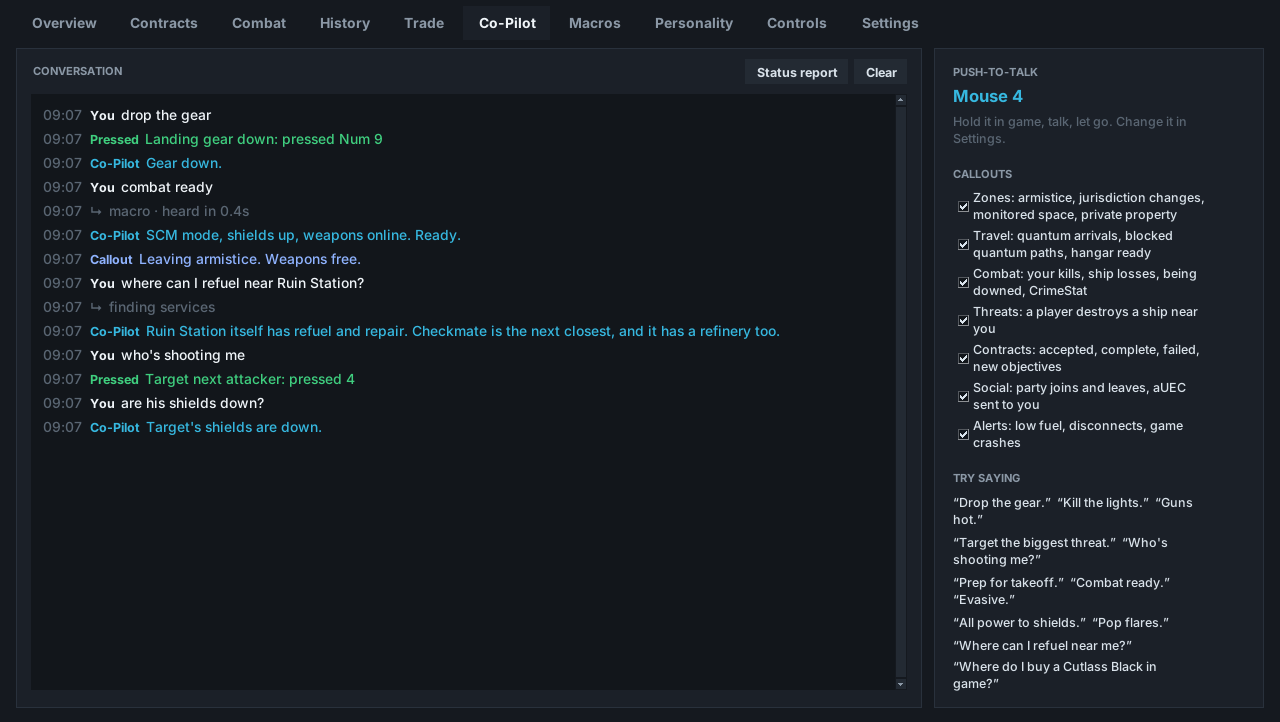
Talk to your ship, hands-free or with a button. It presses your own keybinds, sets your routes, remembers what your ship is doing, checks the HUD to make sure, calls out what's happening around you, and answers questions using your live game data.
SC Co-Pilot is in closed beta: a small crew of pilots flying it, breaking it and saying what's missing. New features land with testers first.
Invite-only, through the Discord.
Anyone can download it from this page.
The full release.
#suggestionsSimple commands are matched right on your PC, so they fire instantly with no AI delay. It understands slang, synonyms and the usual speech-to-text slips, and you can chain several in one breath.
No profiles to import or keybinds to copy. Install it, pick a voice, and fly.
It reads your own Star Citizen bindings, so “gear down” presses whatever you've set. It can fill in actions the game leaves unbound, and backs up your file first.
It remembers whether your gear, power, lights and doors are on, so it never flips something you already did. After pre-flight it looks at your HUD and fixes it if the engines didn't come on.
Turn on voice activation and just say “Co-Pilot, gear down”. No button, no paid plan. Push-to-talk keeps working too.
It reads the log file the game writes as you play, and presses keys the way your keyboard does. It never touches the game's memory.
Gear, lights, shields, power, targeting, countermeasures, landing, doors, quantum and more, using your own keybinds.
One phrase runs a whole sequence: “prep for takeoff”, “combat ready”, “go dark”, “evasive”. Build your own.
Ask about your session, where to refuel or repair, where to buy a ship or component, refinery yields and trade routes.
“Set route to Checkmate” or “take me to my contract.” It opens the starmap, finds the place, sets the route and checks the game took it.
“Lift off and gear up”, “strafe left a little”, “full stop”. Quick nudges or held moves, using your own movement keys.
Armistice, ungoverned space, quantum arrival, kills, losses, CrimeStat, contracts, party joins and aUEC transfers, spoken as they happen.
What each contract pays and the rep it gives, your aUEC per hour, and how close you are to the next rank with every org.
“What size is the Bracer?” Size, class, grade, how it ranks against everything that size, and whether it fits the ship you're in.
Grabs shared contracts before the 5-second pop-up disappears. “Send a distress call” posts a mayday with where you are.
Ask “target status” and it reads your target's shields and hull off your HUD. It can call out when their shields drop.
Natural Kokoro voices that run on your PC with no internet, tuned to say Daymar, Orison, Levski, Orbituary and Quantainium properly. Microsoft's online voices work too.
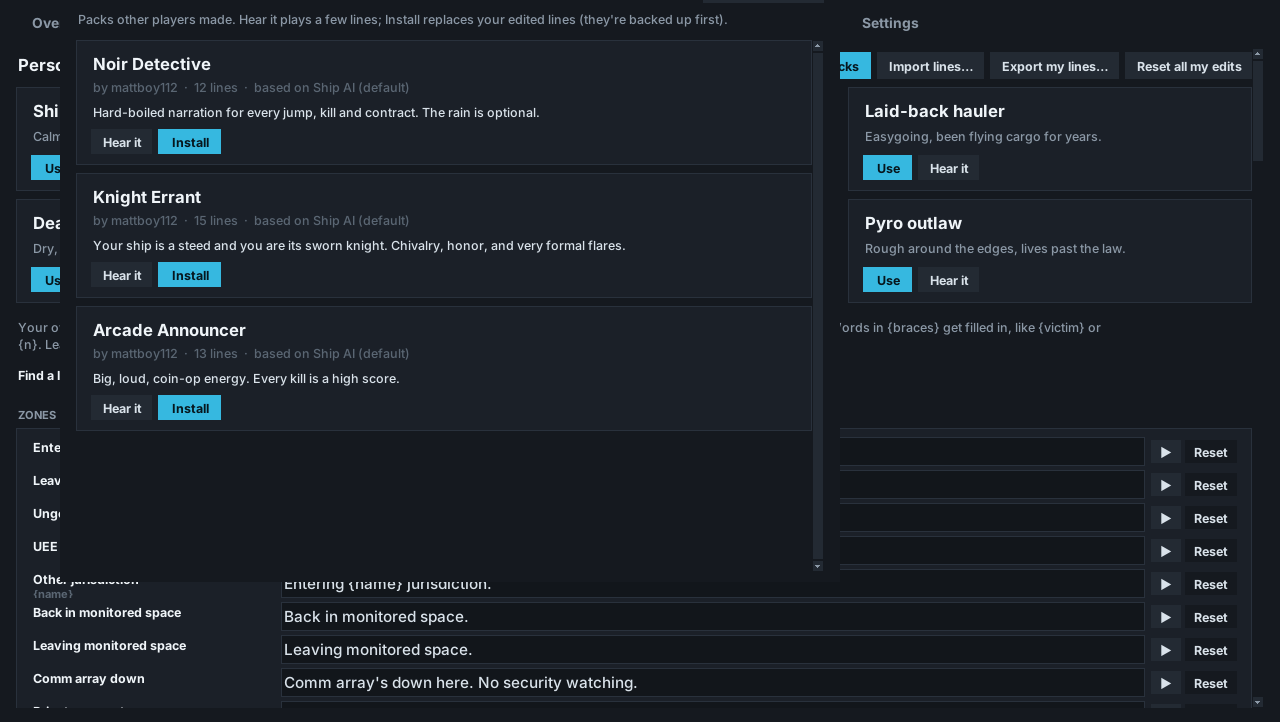
Six built-in characters, every line editable, and a community gallery of line packs to install in one click.
A small click-through panel with your zone, objective, quantum status and timers, plus an AI avatar that reacts when it talks.
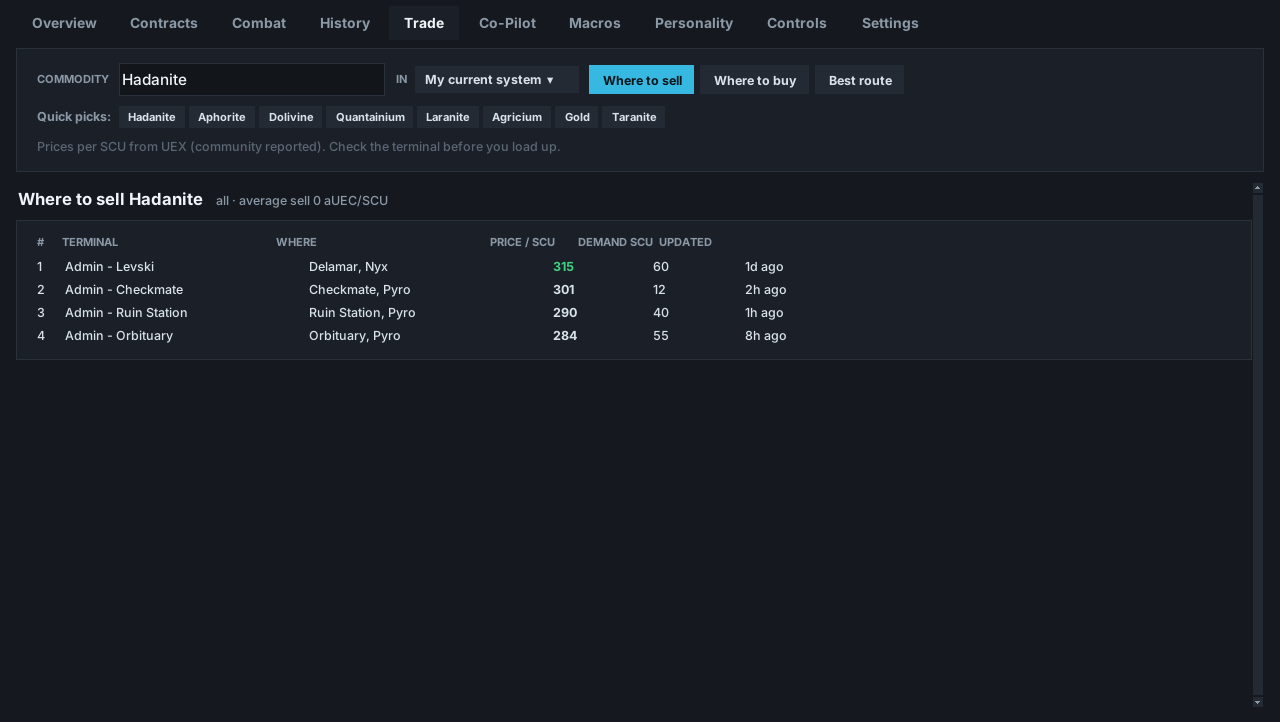
Live player-reported prices from UEX: best place to sell, best place to buy, and routes for your cargo size.
It can look at the game to check itself. Ask “are my engines on?” or “what does that screen say?” and it takes a quick screenshot before answering.
“Set a 3 hour refinery timer.” “Remember my main ship is a Cutlass Black.” Timers survive restarts, and notes stay editable in Settings.
Screenshots of the app with sample data.
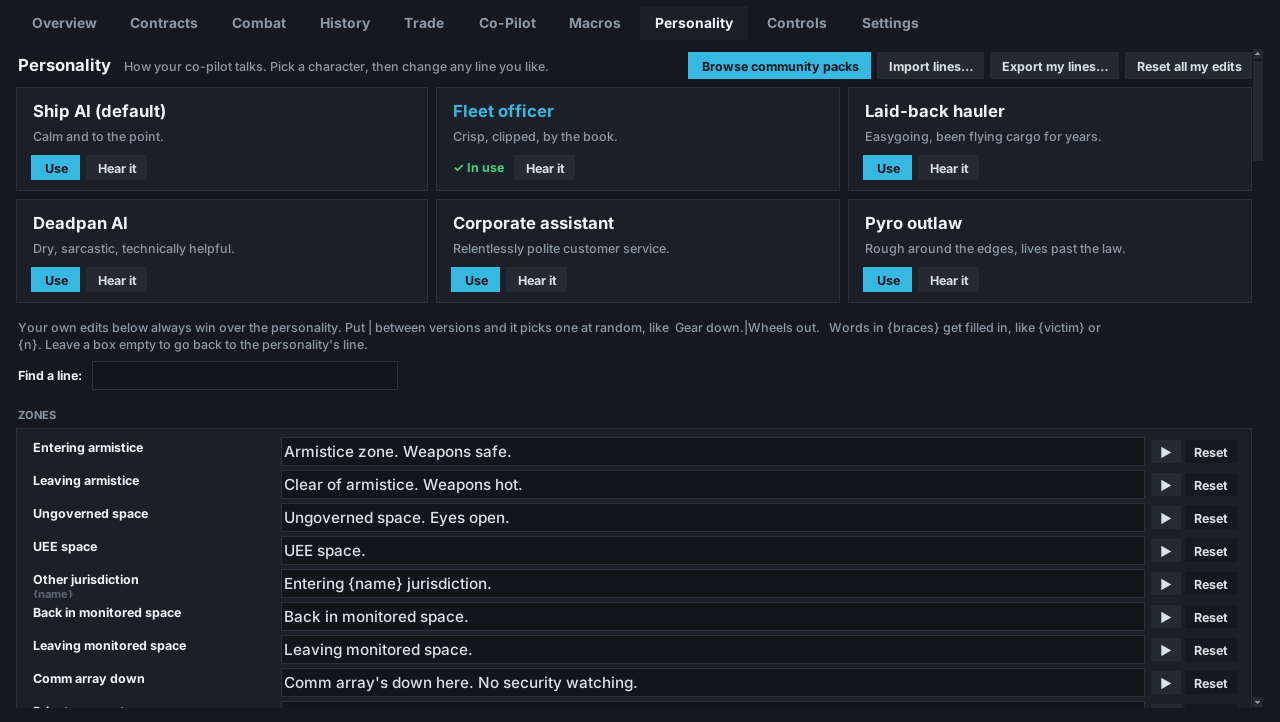
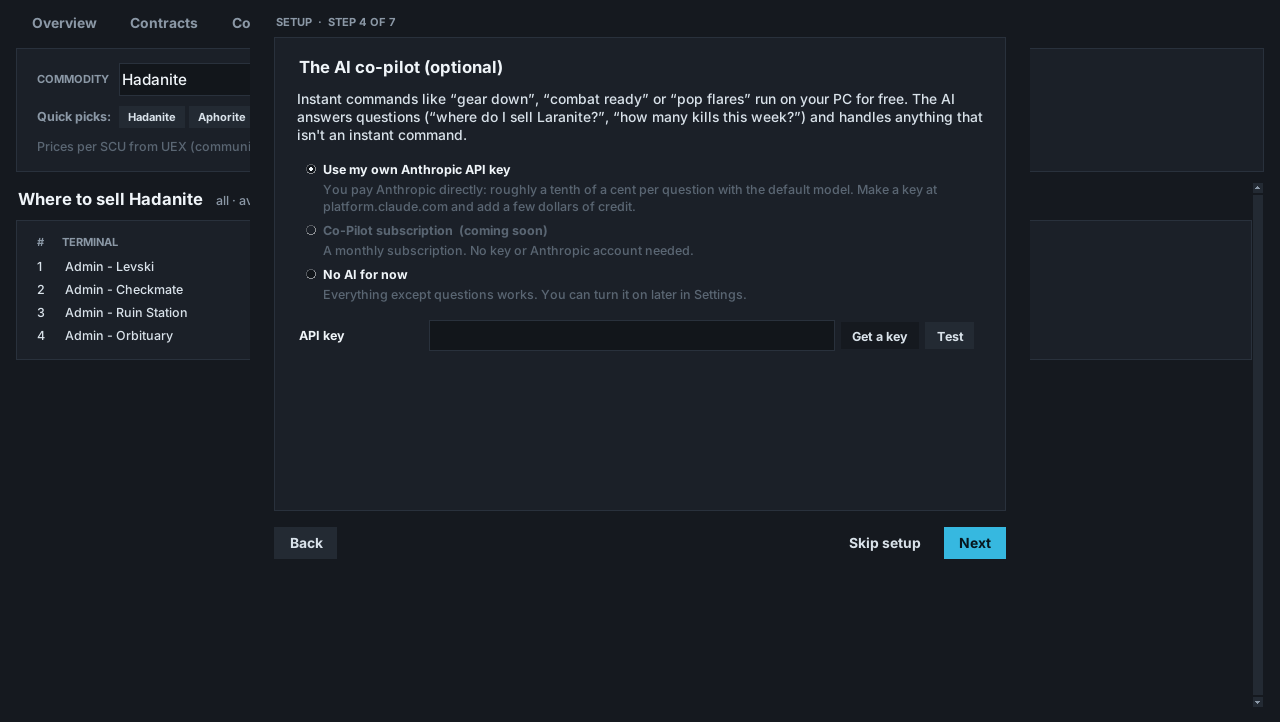
Each one changes the callouts, the replies and how the AI talks. Your own edits always win.
Calm and to the point.
Leaving armistice. Weapons free.
Crisp, clipped, by the book.
Splash one. Gladius down.
Been flying cargo for years.
Out of armistice. Keep your head on a swivel.
Dry, sarcastic, technically helpful.
We've arrived. Try to contain your excitement.
Relentlessly polite.
Please fire responsibly.
Lives past the law.
Out of armistice. Open season.
Made by players, checked by a person, installed from the app under Personality → Browse community packs.
Share yours on DiscordInstant commands, macros, callouts, routes, the overlay and trade prices all work without it.
| Closed beta testers now | AI included, on us. Every tester gets a monthly allowance of AI replies and screen checks, with no key or account needed. |
|---|---|
| Your own Anthropic key | Make a key at platform.claude.com and add a few dollars of credit. You pay Anthropic directly, roughly a tenth of a cent per question with the default model. |
| Co-Pilot plans soon | Free AI replies every month with no card, plus low-cost plans for more. No key or Anthropic account needed. |
| Off | Everything except answering questions still works. |
Spots are limited while the big stuff gets fixed, so every tester gets heard. More open up with each build.
Announcements, patch notes and the open beta date land there first.
Post in #beta-signup: keyboard or HOTAS, your mic, and what you fly most. A mix of setups finds more bugs.
Your installer and beta key are in #beta-builds. Windows may warn the installer isn't signed yet: click More info → Run anyway.
Hit Copy diagnostics in the app and drop it in #bug-reports with what happened. New builds install themselves.
Join the Discord and apply in #beta-signup. Spots are limited for now, and more open up as the builds get steadier.
The target is March 2027. The exact day gets announced on the Discord first, once closed beta testers have shaken out the biggest bugs.
The closed beta is free, AI included. After that the app stays free, voice activation too. The optional AI uses your own Anthropic key (roughly a tenth of a cent per question with the default model) or a Co-Pilot plan with free replies every month.
It doesn't read or change the game's memory and doesn't inject anything. It reads the log file the game writes to disk, and presses keys the way your keyboard does, only when you ask. It is not approved or endorsed by Cloud Imperium, so use your own judgement.
Only what a feature needs, when you use it: your question to the AI (through the Co-Pilot server during the closed beta), price and component lookups, text to Microsoft for their online voices, and update checks. Speech recognition runs on your PC. With push-to-talk, the mic is only used while you hold the button. With voice activation, it listens on your PC all the time, but only what you say after its name goes anywhere. Screen checks send a screenshot of the game to the AI and nothing is saved. Full privacy details.
No. It reads your binds and presses what you've set. It can give spare keys to actions Star Citizen leaves unbound, like separate gear up and gear down, but only when you click it, and it backs up your bindings file first.
Yes. Push-to-talk can be any key, mouse button, controller or joystick button.
Yes. It can listen and answer in English, German, French, Spanish, Italian, Portuguese or Dutch, with Microsoft voices for each. Instant commands and callouts are in English, but you can rewrite every line or install a community line pack.
Star Citizen doesn't write them to its log file. It can look at your screen instead: the target reader reads your target's shields and hull, and screen checks let the AI look at your HUD when you ask.
The closed beta is free and invite-only. Join the Discord to grab a spot, and you'll hear first when the open beta opens.
 SC Co-Pilot